
When most people think about a camper van electrical system, they think about solar panels, batteries and maybe a WiFi router.
I took things a little further.
At the heart of our current smart camper van is a M4 Mac Mini that acts as the central brain for almost everything we do on the road.
It manages our smart home systems, stores our files and photos, streams movies, synchronises podcasts, runs automations, and acts as our personal cloud while travelling throughout Europe.
The best part?
It does all of this while consuming surprisingly little power and taking up almost no space.
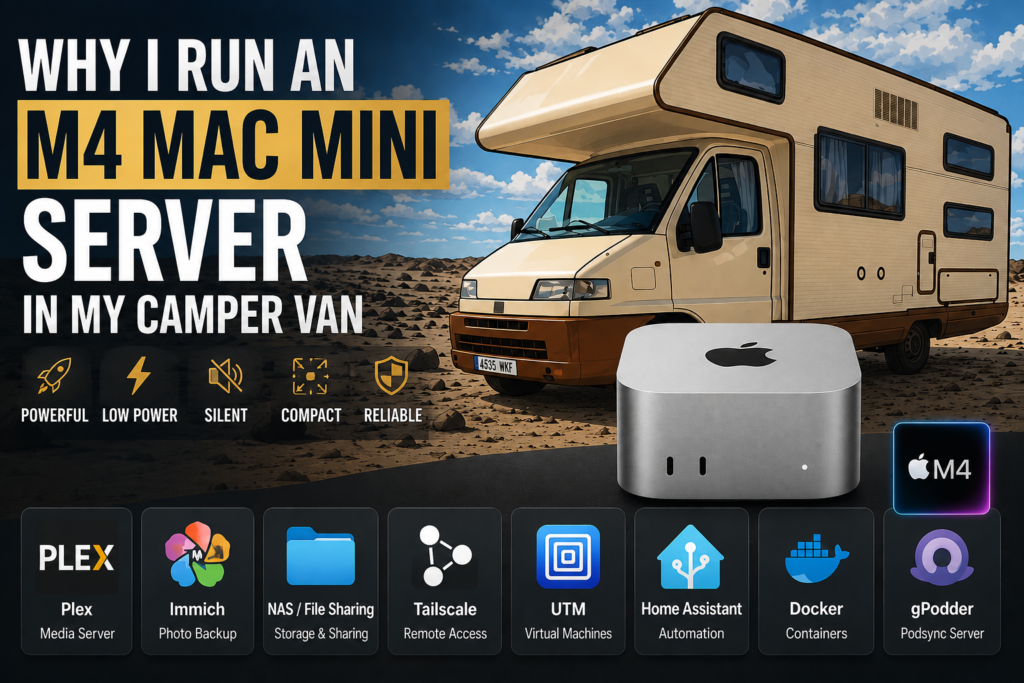
Why I Chose the M4 Mac Mini
There are plenty of small computers capable of running server applications.
Mini PCs, Raspberry Pis, NAS devices and custom-built servers are all popular options.
For me, the M4 Mac Mini hit the sweet spot.
It offers:
- Incredible performance
- Extremely low power consumption
- Silent operation
- Tiny footprint
- Outstanding reliability
- Ties in with the rest of our preferred Apple ecosystem
Space is always limited in a camper van, so having a powerful machine that occupies very little room is a huge advantage.
The M4 Mac Mini is capable of running multiple demanding services simultaneously while barely breaking a sweat.
Even under heavy use, it remains quiet, cool and remarkably efficient.
What My Camper Van Server Runs
The Mac Mini isn’t just a media server.
It’s effectively the digital backbone of our entire van.
Currently it hosts:
Home Assistant
Home Assistant acts as the central controller for our smart camper.
Lights, sensors, switches, monitoring systems, automations and notifications all run through Home Assistant.
The result is that every smart device can communicate with every other smart device.
Instead of having dozens of separate apps, everything works together through a single platform.
It also allows us to monitor and control the van from anywhere, remotely – for example, checking the temperature inside the van and turning the Air Con on before we get back so its not like walking into an oven!
Plex
Our Plex server stores our entire media collection.
This allows us to stream movies and TV shows anywhere in the van without needing an internet connection. Now I have spoken a lot about the best 5G and internet setups for van life, but when you do find the perfect spot, right on a remote beach if the sacrifice is a slower internet speeds, then at least if that doesn’t stop you listening to music or watching something then it is much less impactful as many other day to day tasks can still be done even with 2-3Mbps download speeds.
Combined with our projector setup, it effectively gives us a private cinema on wheels.
Immich
Immich has become one of my favourite self-hosted services.
Every photo taken on our phones is automatically uploaded to our server.
Instead of relying on cloud subscriptions, we maintain complete ownership and control of our photos, local and 100% ours is the best thing here, with the option to back them up 100% encrypted and to a 100% private cloud, plus saving monthly subscription costs to the well known tech giants out there, this is a win, win & win again!
Even while travelling, our memories are automatically backed up and available from anywhere.
Music Assistant
Music Assistant provides a unified music platform throughout the van. It pulls everything together so our Music, Radio & Podcasts are all together on one screen along with all the areas so playing whatever we want is always just a click away.
It integrates beautifully with Home Assistant and allows us to manage audio devices from a single interface, and with beautiful artwork shown on our dashboard it all comes together perfectly.
gPodder Sync
Podcasts are a big part of life on the road.
gPodder Sync keeps listening progress synchronised across devices, making it easy to continue where we left off.
This is something I only discovered recently, but again why is everything we do tracked by everyone! Hosting your own podcasts sync server is just yet another part of your life you can keep private.
File Storage
The Mac Mini also acts as our central file server.
Documents, project files, videos, backups and media are all stored locally and accessible throughout the van.
32TB of Storage on the Road
Connected to the Mac Mini is 32TB of external storage, now of course this could be connected to any machine. it doesn’t have to be a Mac mini, but again Apple makes it very easy to share folders and drives, built in automatic backups means its one less thing to have to setup and configure, it just works, always.
We store:
- Movies
- TV shows
- Family photos
- Video projects
- Backups
- Documents
- Home Assistant data
Having this much storage onboard means we rarely need to think about capacity.
Everything lives in one place and is available whenever we need it. It is immediately backed up to an identical drive (x2 16TB External drives)
Then we also have Mega as our offsite backup for important data, they have a free forever tier of 20GB and very reasonable pricing for larger storage & faster speeds. Plus it is very easy to get additional storage with them for free, if you would like to know more just drop me a note below.
The Smart Camper Ecosystem
What makes this setup particularly powerful isn’t any individual application.
It’s how everything works together.
Motion sensors trigger automations.
Smart speakers provide voice control & audio everywhere.
The alarm system integrates with Home Assistant.
Battery monitoring, internet connectivity and smart devices all feed into the same ecosystem.
Rather than having a collection of disconnected gadgets, the entire van behaves like a single intelligent system.
The iPad Pro Dashboard
To control everything, we use an iPad Pro mounted inside the camper.
This acts as our central dashboard.
From one large 12.9″ screen we can:
- Monitor battery levels
- Control lighting
- Control temperatures heating/cooling
- View security alerts
- Manage media playback
- Open/Close Waste Tanks
- Check internet connectivity
- Monitor server performance
It’s effectively the control centre for the entire vehicle.
Real-World Performance
This is where the M4 Mac Mini continues to impress me.
At any given moment it may be:
- Running Home Assistant automations
- Recording sensor data
- Serving files
- Hosting Immich
- Streaming Plex content
- Synchronising podcasts
- Managing smart devices
It’s not unusual for me to be streaming a 4K movie through Plex while my wife uploads hundreds of photos into Immich and Home Assistant continues to run automations in the background.
Despite all of this, the Mac Mini never seems stressed.
Everything remains responsive and reliable.
It simply gets on with the job.
Internet Connectivity
A server becomes far more useful when it remains accessible from anywhere.
That’s why the Mac Mini is connected to our dedicated 5G internet system.
Using a dedicated router and external antenna allows us to access services remotely, synchronise files, and maintain connectivity throughout our travels.
If you’re interested in the networking side of the setup, I’ve covered it in more detail here:
[Read: Best Internet Setup for Full-Time Van Life →]
and
[Read: Best 5G Router for Camper Vans →]
Would I Build This Again?
Absolutely.
In fact, if I were building another smart camper tomorrow, the M4 Mac Mini would probably be one of the first components I purchased.
It has proven to be reliable, efficient, incredibly capable and surprisingly power-friendly.
For anyone interested in creating a truly connected camper van, it’s become one of my favourite pieces of equipment.
Need Help Building Something Similar?
Building a smart camper ecosystem can feel overwhelming at first.
Choosing hardware, configuring Home Assistant, setting up storage, networking devices together and creating reliable automations all take time.
If you’d like help designing or building a system similar to ours, I offer one-to-one consultancy covering:
- Home Assistant
- Smart camper automation
- Networking and internet systems
- Media servers
- Storage solutions
- Remote access
- System architecture
Whether you’re just getting started or looking to improve an existing setup, feel free to get in touch.

Hi, I’m Luke.
I’ve personally renovated three camper vans from the ground up, including complete electrical systems, plumbing, solar, networking and smart automation.
This website documents my latest project: building one of Europe’s most advanced smart camper vans.
About me | Consultation Service | Work with me
Pingback: How I put home assistant inside my rv – LTH Media