
Why I Replaced Every Switch in My Campervan With One Smart Dashboard
Every Camper Has Too Many Controls
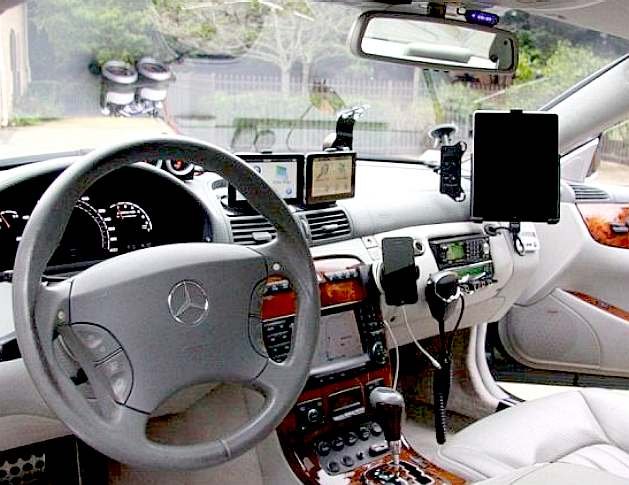
If you’ve spent any time in a campervan, you’ve probably noticed something.
Nothing talks to anything else.
The cab has its own climate controls, central locking, navigation screen and maybe Apple CarPlay or Android Auto.
Walk into the back and it’s a completely different story.
The roof fans have their own remote.
The heater has another controller.
The water heater has another.
The fridge has its own control panel.
The water tank has another display.
Every light seems to have its own switch.
Then there are the manual jobs…
Pull handles for the waste tanks.
Cranks for the roof vents.
Different switches scattered around the van depending on who built each system.
Even though many factory campervans use equipment from the same one or two manufacturers, almost none of it works together.
Traditional camper controls look something like this:
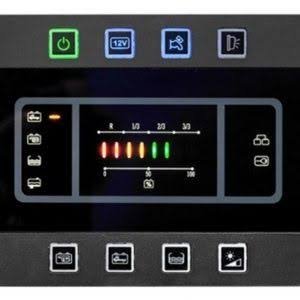
After building several campervans, I finally reached the point where I’d had enough.
I didn’t want six control panels.
I wanted one.
The Goal
I wanted one dashboard that could control almost everything in the van.
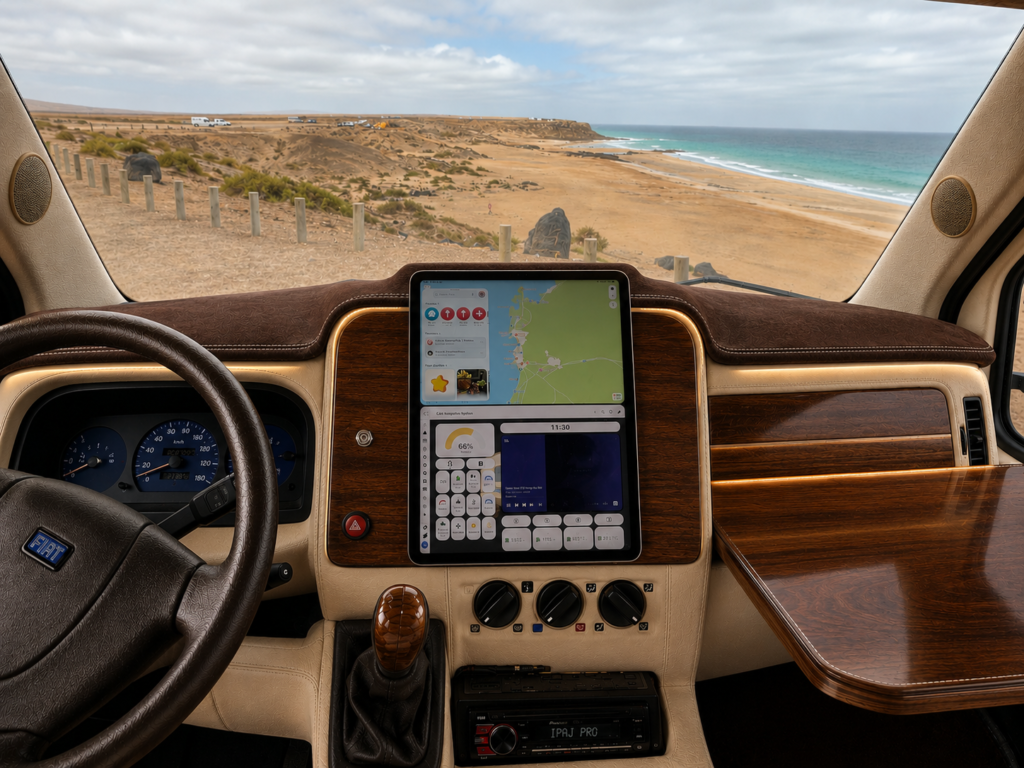
Not just when we were parked.
While we were driving too.
The challenge wasn’t replacing Apple CarPlay or Android Auto.
Those already do navigation, phone calls and music reasonably well.
The challenge was everything they don’t do.
They know nothing about your camper.
What Does A Camper Driver Actually Need?
Driving a campervan is completely different from driving a normal car.
You’re managing far more than simply getting from A to B.
Sometimes I want to know:
- How much battery power do we have left?
- How much solar are we generating?
- Are the roof vents still open?
- Is the rear door locked?
- Are the water tanks getting full?
- Is the air conditioning running?
- Are the kids comfortable in the back?
- Which camera should I be looking at?
Instead of opening five different apps or reaching for another remote, I wanted everything available from one screen.
Navigation That Actually Works For Campervans
Of course, navigation is still the most important feature.
Whether you use Google Maps, Apple Maps or a dedicated camper navigation app like Sygic, having clear directions is essential. This is one huge win when using an iPad, you have many options for navigation all on the device.
But I didn’t want navigation taking over the whole dashboard.
When we’re driving somewhere familiar, I’d much rather use that space for information that’s actually useful.
Battery status.
Solar production.
Cameras.
Air conditioning.
Media.
The map is there when I need it, but it doesn’t dominate the screen.
Cameras Everywhere
One reversing camera is good.
Four is even better.
The dashboard automatically switches to the correct camera whenever I select reverse, but I can also bring up any camera instantly with a single tap.
Whether I’m squeezing into a tight parking space or checking what’s happening behind the van while parked overnight, the cameras are always available.
It makes driving a large camper much less stressful.
The best part, the cameras are cheap, fully integrated into home assistant you can add as many as you like, use them for security with a bunch of automations all for free within home assistant.
Climate Control Without Leaving The Driver’s Seat
This is probably one of the features we use most.
Ten minutes before arriving somewhere, I can switch on the air conditioning or heater so the living area is already comfortable when we stop.
If the kids are sitting in the back and they’re too hot…
One tap.
Too cold…
One tap.
No searching for remotes.
No climbing into the back.
If you’ve read my air conditioning article, you’ll already know how much work went into making our off-grid cooling system possible.
Read my 100% solar powered Air Conditioning post here
Making The Most Of Free Energy
When we’re driving, our alternator is charging the batteries.
That means it’s often the perfect time to run larger electrical loads.
Need hot water?
Turn on the water heater.
Need to top the batteries up?
Adjust the alternator charging.
Need to check solar production?
It’s all there.
Instead of guessing what’s happening electrically, I can see everything in real time.
For full control of our alternators power we use the Bluetti Charger 1 again integrated with home assistant.
Little Things That Make A Big Difference
Some of my favourite features aren’t the complicated ones.
They’re the tiny improvements that save time every single day.
For example, our waste tanks.
As soon as I pull over a dumping point, I simply press a button.
The valves open electronically.
The tanks empty.
I can monitor the level dropping on the same screen.
No crawling underneath the van.
No pulling dirty handles.
No wet sleeves.
It’s one of those features you don’t realise you need until you’ve lived with it.
Built-In Safety Features
Modern cars are full of safety reminders.
I wanted the camper to behave the same way.
If any door is open, the dashboard immediately shows a large warning.
If the rear door hasn’t been locked properly…
Warning.
Before driving away I can also close every roof vent from one button.
If it suddenly starts raining…
One tap.
If we’re joining the motorway…
One tap.
No wondering whether a roof vent has been left open.
No stopping five minutes later to check.
My Favourite Feature…
The Level System
Oddly enough, this has become one of my favourite additions.
Using a sensor that cost less than €10, I built a digital levelling system directly into the dashboard.
Instead of climbing in and out of the van with a spirit level, the screen tells me exactly:
- which wheel needs raising
- how much pitch the van has
- how much roll the van has
It makes levelling quicker than we’ve ever managed before.
Considering how inexpensive the hardware was, it’s probably one of the best upgrades on the entire van. And I was moments away from buying a $500+ system that would have had its own standalone app…
I will document this full feature in another post soon.
Driving Mode
If you’ve read some of my other articles, you’ll already know that an iPad controls almost everything inside our camper.
Driving mode takes that same dashboard and completely transforms it.
The buttons become larger.
The layout changes.
Only the information I need while driving is shown.
The entire interface has been designed to minimise distractions while making important controls easier to reach.
It’s still the same dashboard…
Just optimised for driving.
It’s Still Evolving
Creating this dashboard has probably been my favourite project on the entire camper.
Not because it’s flashy…
But because it brings everything together.
Every time I add a new feature somewhere else in the van, I can usually integrate it into the dashboard as well.
That means the system keeps getting better.
If something stops working, or after using for a few days it is too many clicks or the button is too small, I change it. Every time I drive I can find a way to make it better.
I’m constantly refining layouts, adding automations and finding ways to make everyday tasks simpler.
So this article will continue to grow as the dashboard evolves.
What Powers It All?
The iPad is really just the display.
Behind it is an entire smart system that brings everything together.
Home Assistant handles the automations.
The camper’s network keeps every device connected.
The server processes the information.
The iPad simply presents it all in a way that’s easy to understand.
I’ll be covering that complete system in another article soon.
Final Thoughts
Replacing dozens of switches, remotes and control panels with one intelligent dashboard has completely changed the way we use our campervan.
It’s easier to drive.
Easier to monitor.
Easier to live in.
And the best part…
Every time I think of a new idea, I don’t need to install another switch somewhere.
I simply add another button.
If you want to see how I fit iPads in our campers, read this post – how to fit an iPad in your car or motorhome
I will cover every part of the ultimate dashboard in more detail as I appreciate not everybody will want everything. If you are planning on using an iPad like myself, you need a cellular model, you don’t need to purchase a sim or data plan, but it must have the sim slot as this means the iPad has a GPS antenna. If you already have a wifi only model or want a better GPS antenna add a Garmin Bluetooth receiver – It pairs with your iPad over bluetooth and enables any navigation app to work flawlessly. Again, I will cover this in more detail in another post soon.

Hi, I’m Luke.
I’ve personally renovated three camper vans from the ground up, including complete electrical systems, plumbing, solar, networking and smart automation.
This website documents my latest project: building one of Europe’s most advanced smart camper vans.
Are you looking to build your own ‘Smart Van’? If you need help, get in touch.
About me | Consultation Service | Work with me

Pingback: How to Install an iPad on your dashboard – LTH Media